Hey Grade 9! Get ready to embark on a year of discovery and growth. Here’s how to access our online learning space:
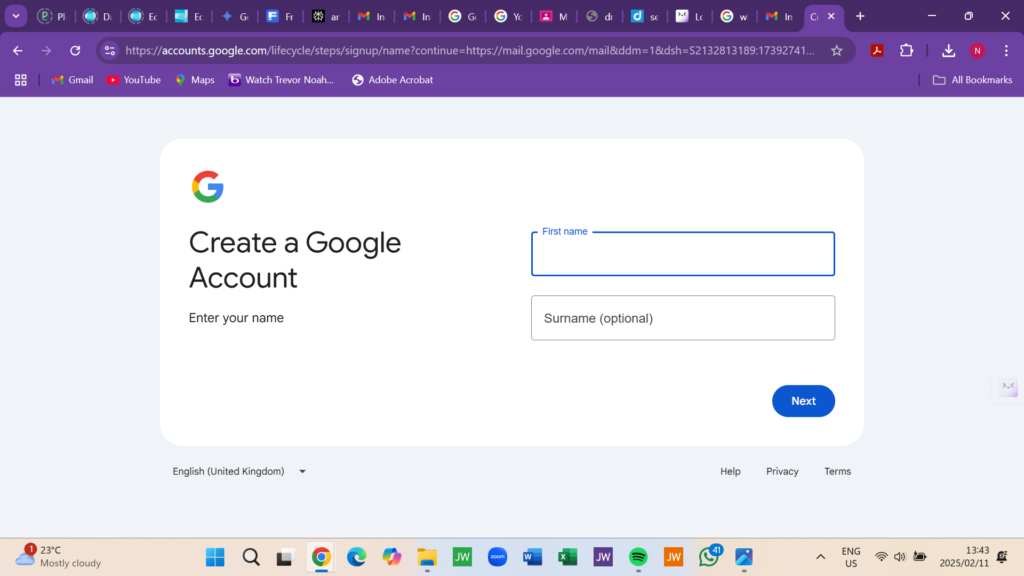
Step 1 Establish Your Google Identity (if needed!)
Already have a Google Account (like Gmail)? Awesome, you’re set! Jump to Step 2. Need to create your digital identity? It’s quick and easy:
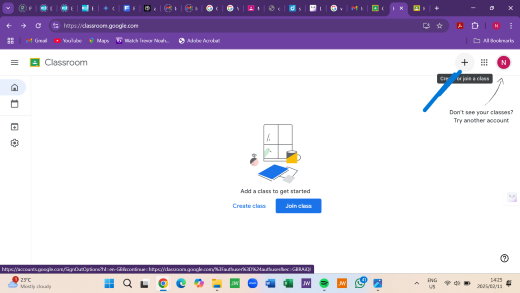
Step 2: Access Google Classroom Portal
Time to enter the Google Classroom Portal!
Do This: Click here: classroom.google.com
Step 3: Enter the Secure Class Code! Code!
Do This:
(4) Restrict Access: Secure Class Code!
Grade 9 Secure Class Code:
For Authorized Grade 9 Users ONLY! Keep this confidential.
(5) Navigation Assistance:
Assistance Required? Contact Support Services!
(6) Engage!
Enter the destination URL
Or link to existing content